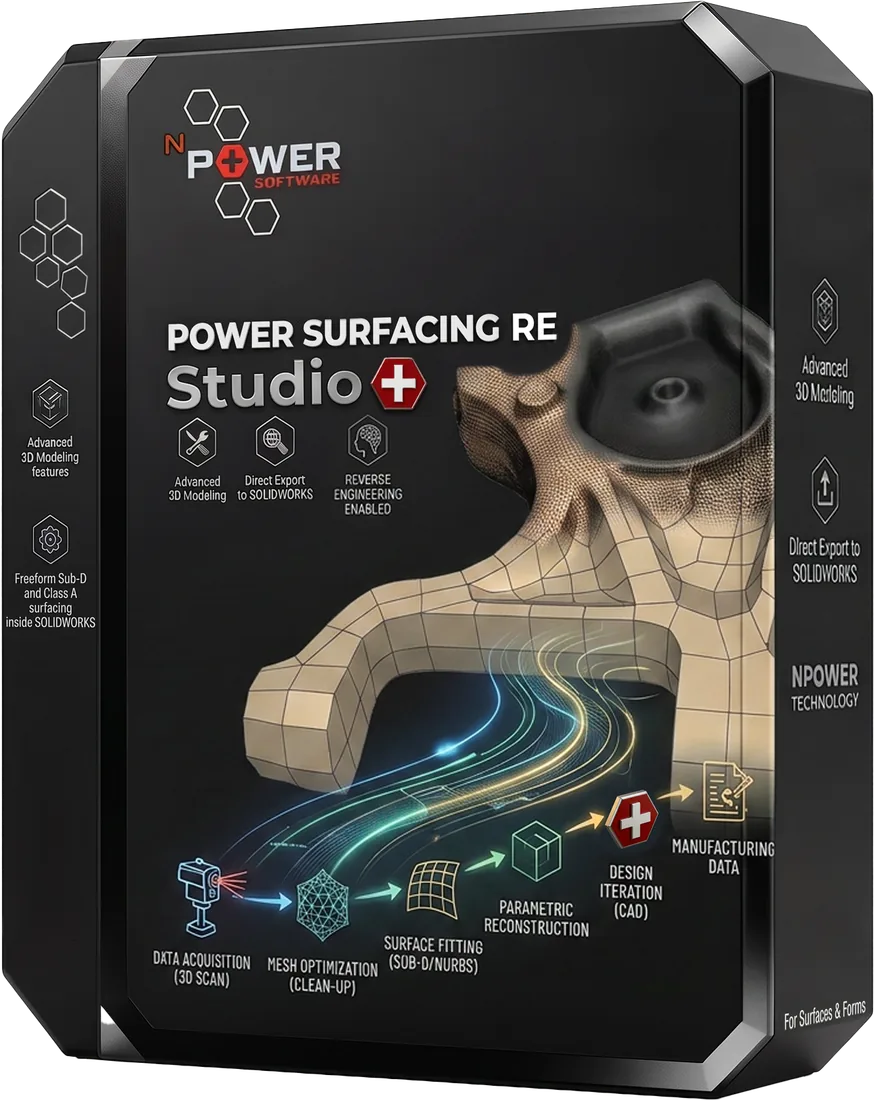
Power Surfacing RE Studio
Power Surfacing RE Studio is standalone Windows reverse-engineering and scan-to-CAD software for reconstructing mechanical, organic and hybrid parts — converting 3D scan meshes, STL files and polygon models into editable CAD surfaces and solids.
Convert 3D Scan and Mesh Data into Editable CAD
Power Surfacing RE Studio is built for reverse engineers, 3D scan technicians, industrial designers, medical and prosthetics professionals, and artists who need to turn polygon mesh data into real, editable CAD geometry. Typical starting points include 3D scan meshes, STL files, Wavefront OBJ meshes, ZBrush and other sculpted models, and SOLIDWORKS Topology Study output.
Power Surfacing RE Studio reverse engineers freeform organic parts, mechanical parts and hybrid parts that combine both. Its ability to identify and extract mechanical surfaces and solids — planes, cylinders, cones, spheres, extruded and revolved shapes — makes it a powerful choice for almost any reverse-engineering task.
From that mesh data, RE Studio reconstructs high-quality, G2-continuous NURBS surfaces and solid bodies that can be modified, measured and used in downstream engineering workflows. Because RE Studio includes the complete Power Surfacing Studio toolset, reconstructed geometry can be combined with dimension-driven sketches, feature-based solids and freeform Sub-D modeling — all in one standalone Windows application, with no third-party CAD license required.
Power Surfacing RE Studio Features
Mesh Import and Preparation
Import STL and Wavefront OBJ files, as well as SOLIDWORKS Topology Study meshes. Built-in mesh repair, smoothing and hole-filling tools prepare scanned or sculpted data for reconstruction.
Quad Wrap Retopology
Quad Wrap generates a clean quad layout that follows the curvature flow of the underlying mesh, producing a structured foundation for high-quality surface reconstruction.
Sub-D Surface Reconstruction
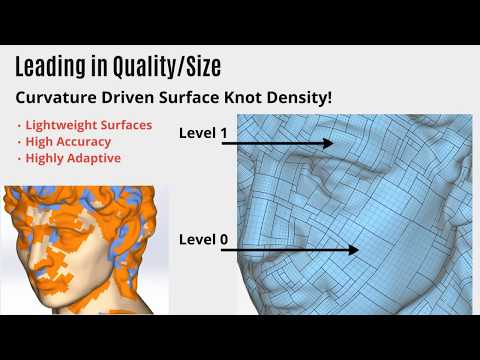
Rebuild scanned and sculpted meshes as editable Sub-D geometry. The Shrink Wrap tool captures very fine surface detail without adding polygons, preserving detail on jewelry, cutlery and consumer products.
Automatic and Analytic Surface Fitting
Automatically identify and extract mechanical surfaces and solids — planes, cylinders, cones, spheres, extruded and revolved shapes — so mechanical regions of a scan become true analytic CAD geometry rather than approximations.
Dimension-Driven Sketching
Create sketches controlled by parametric dimensions, constraints and relationships — part of the complete Power Surfacing Studio toolset included in RE Studio.
Feature-Based Solid Modeling
Build models with a construction history that can be edited and rolled back at any time, combining reconstructed scan geometry with conventional CAD features.
Surface and Solid Creation
Convert Sub-D geometry into Brep NURBS surfaces with G2 edge continuity, and create solid bodies. Advanced shelling supports variable wall thickness on complex geometry.
CAD Export
Export reconstructed surfaces and solids to STEP, STL and Wavefront OBJ, or transfer geometry as native SOLIDWORKS features.
How the Scan-to-CAD Workflow Works
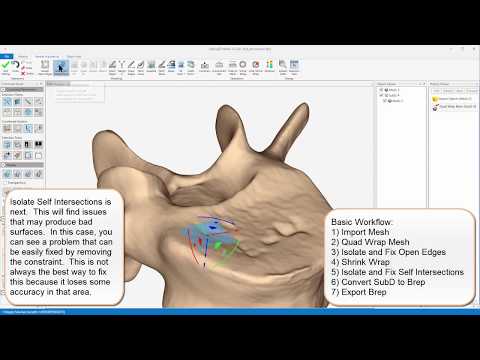
- 1
Import scan or polygon mesh data
Load STL or OBJ data, or bring in sculpted meshes and SOLIDWORKS Topology Study output.
- 2
Inspect and prepare the mesh
Repair defects, fill holes and smooth noisy regions so the mesh is ready for reconstruction.
- 3
Generate a quad layout
Use Quad Wrap retopology to create a clean quad structure that follows the curvature flow of the mesh.
- 4
Build editable Sub-D geometry
Reconstruct the shape as editable Sub-D geometry, using Shrink Wrap to capture fine surface detail.
- 5
Fit analytic or freeform surfaces
Automatically identify and extract planes, cylinders, cones, spheres, extruded and revolved shapes where appropriate, keeping freeform regions as smooth NURBS surfaces.
- 6
Create surfaces or solids
Convert to Brep NURBS surfaces with G2 edge continuity and build solid bodies, including shelled parts with variable wall thickness.
- 7
Export to downstream CAD
Export the reconstructed model to STEP, STL or Wavefront OBJ, or transfer it as native SOLIDWORKS features.
Supported Input and Output Formats
Input Formats
- STL
- Wavefront OBJ meshes
- Sculpted meshes (e.g. ZBrush exports via STL/OBJ)
- SOLIDWORKS Topology Study meshes
Output Formats
- STEP
- STL
- Wavefront OBJ
- Native SOLIDWORKS features
Not Supported
- PLY — not supported; convert PLY scans to STL or OBJ before import
- IGES, SAT and Parasolid export — not supported; use STEP, STL, OBJ or native SOLIDWORKS features
Power Surfacing RE Studio vs. Power Surfacing RE for SOLIDWORKS
Power Surfacing RE Studio is a standalone Windows application. It does not require SOLIDWORKS or any other third-party CAD license, and it includes the complete Power Surfacing Studio modeling toolset alongside its reverse-engineering capabilities. Reconstructed geometry is exported to downstream CAD systems using STEP, STL or Wavefront OBJ, or transferred as native SOLIDWORKS features.
Power Surfacing RE for SOLIDWORKS operates directly inside SOLIDWORKS as an add-in and is primarily targeted at reverse engineering organic data. It brings Quad Wrap retopology, Sub-D reconstruction and surface fitting into the SOLIDWORKS environment, where results become SOLIDWORKS surface and solid bodies integrated with the feature tree. Mechanical data must be reconstructed using native SOLIDWORKS tools.
Choose RE Studio if you want an independent application with no SOLIDWORKS requirement — including automatic identification and extraction of mechanical surfaces and solids; choose RE for SOLIDWORKS if your workflow lives inside SOLIDWORKS and your parts are primarily organic.
An Alternative to Geomagic Design X and QuickSurface
Teams evaluating reverse-engineering software often compare Power Surfacing RE Studio with Geomagic Design X and QuickSurface. RE Studio may be a good fit for users who work with organic and sculpted shapes as well as mechanical parts, who want an included Sub-D and NURBS modeling toolset in the same application, or who are looking for a lower-cost standalone option with STEP, STL and Wavefront OBJ export plus native SOLIDWORKS feature transfer. The right choice depends on your scan data, part types and budget — the detailed comparison pages below walk through the differences.
What Our Customers Say
"RE Studio converted a scan that took us days in other tools into clean NURBS surfaces in under an hour. The Quad Wrap retopology is remarkable."
David M.
Reverse Engineering Specialist, Aerospace Supplier
"We digitize clay models for consumer products, and the fine detail capture is the best we've seen at any price point."
Sarah K.
Design Director, Product Studio
"The STEP export drops straight into our downstream CAD with no cleanup. It just works."
James T.
Mechanical Engineer, Medical Devices
Pricing
Perpetual License
$8,995$6,995
One-time purchase, yours forever
Annual Maintenance
$1,795/year
Updates and support for perpetual licenses
Annual Subscription
$3,995$2,995/first year
$3,995/year thereafter — includes updates and support
Introductory perpetual pricing available through June 2027. Choose a perpetual license with optional maintenance, or a lower-upfront annual subscription.
Power Surfacing RE Studio FAQ
What is Power Surfacing RE Studio?
Power Surfacing RE Studio is standalone Windows reverse-engineering and scan-to-CAD software that reconstructs 3D scan meshes, STL files and polygon models as editable NURBS surfaces and solids. It includes the complete Power Surfacing Studio modeling toolset.
Does Power Surfacing RE Studio require SOLIDWORKS?
No. RE Studio is a fully standalone Windows application and does not require SOLIDWORKS or any other third-party CAD license.
Can it convert STL meshes into CAD?
Yes. RE Studio imports STL files and reconstructs them as editable NURBS surfaces and solid bodies that can be exported to STEP, STL or Wavefront OBJ, or transferred as native SOLIDWORKS features.
What is Quad Wrap?
Quad Wrap is RE Studio's retopology tool. It generates a clean quad layout that follows the curvature flow of the underlying mesh, producing a structured foundation for high-quality Sub-D and NURBS surface reconstruction.
Can it create editable NURBS surfaces?
Yes. RE Studio converts Sub-D geometry into Brep NURBS surfaces with G2 edge continuity, and can automatically identify and extract mechanical surfaces and solids such as planes, cylinders, cones, spheres, extruded and revolved shapes.
Can it create solid CAD models?
Yes. RE Studio creates solid bodies as well as surfaces, and supports advanced shelling with variable wall thickness on complex geometry.
Which file formats does it support?
Inputs: STL and Wavefront OBJ files, plus SOLIDWORKS Topology Study meshes. Outputs: STEP, STL, Wavefront OBJ and native SOLIDWORKS features. PLY, IGES, SAT and Parasolid are not supported.
How does RE Studio differ from Power Surfacing Studio?
Power Surfacing Studio focuses on standalone CAD, Sub-D surfacing, sketching and feature-based modeling. RE Studio includes the entire Studio toolset and adds reverse-engineering capabilities for reconstructing scanned and polygonal mesh data.
How does RE Studio differ from Power Surfacing RE for SOLIDWORKS?
RE Studio is a standalone Windows application that exports via STEP, STL and Wavefront OBJ, or transfers geometry as native SOLIDWORKS features. Power Surfacing RE for SOLIDWORKS runs as an add-in inside SOLIDWORKS, where reconstructed geometry becomes SOLIDWORKS surface and solid bodies integrated with the feature tree.
Is a free trial available?
Yes. A free trial of Power Surfacing RE Studio is available from the trial downloads page.
Start Using RE Studio Today
Download a free trial of Power Surfacing RE Studio and experience the difference.